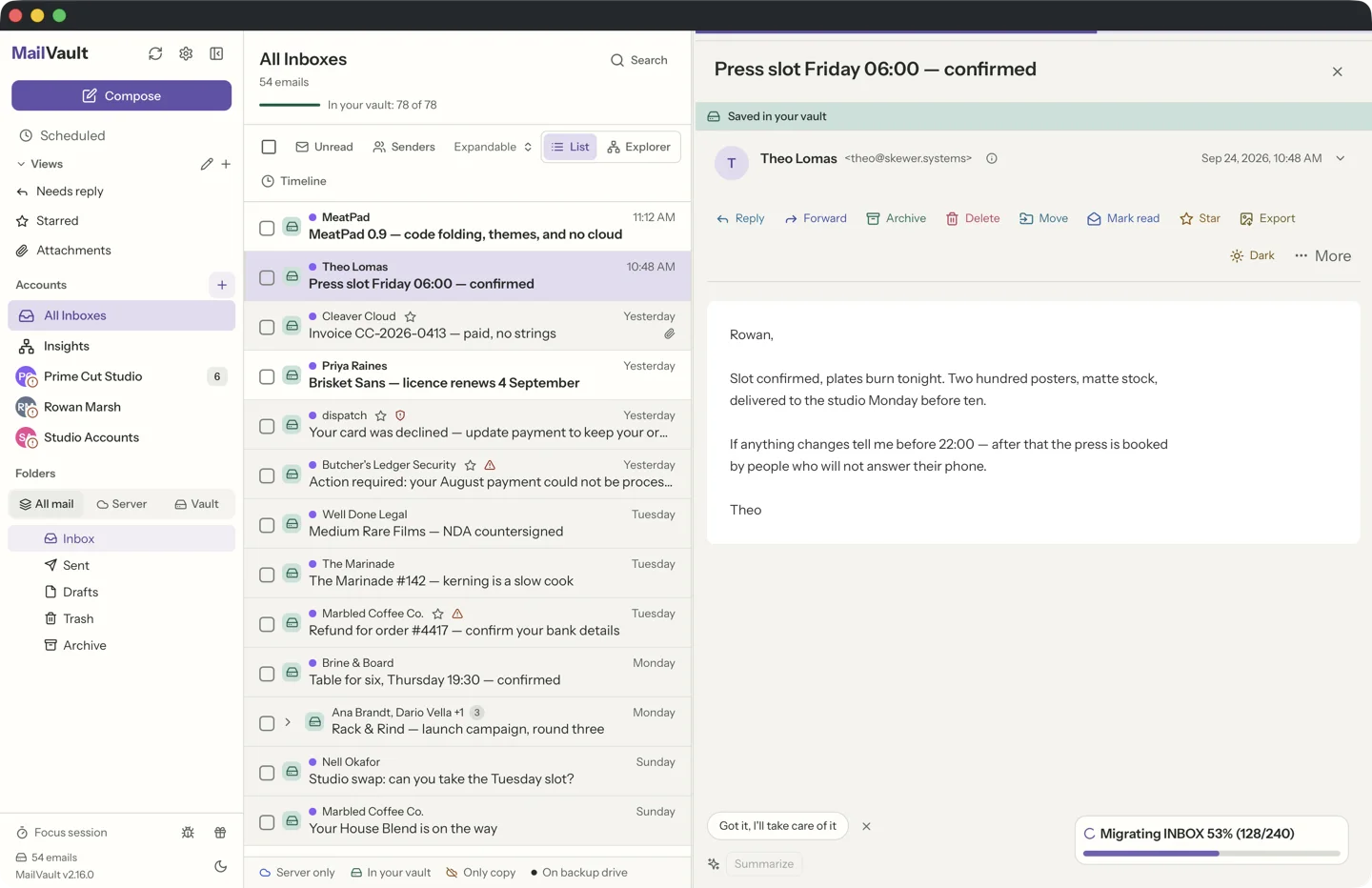
Most advice about great apps is about the parts you can screenshot: a clean layout, a nice colour palette, smooth animations. Those matter. But when I look at the decisions that actually made people trust my app, almost none of them show up in a screenshot.
MailVault is a desktop email client for macOS, Windows and Linux whose main job is simple to say and hard to get right: save your email on your own computer as plain files, so you can free up space on the server without losing anything. I build it on my own. It has shipped 72 changelog entries since February 2026, roughly one release every four days.
This is what I have learned about making an app good, using MailVault as the worked example. Each section ends with the habit you can steal.
1. Write down what the product believes, before you design it
Before there was a design system, there was a short product file. Four lines in it settle more arguments than any mockup:
The user's copy is the product.
Never let the user guess where a message lives.
Destructive is fine; ambiguous is not.
Free stays whole.
"Destructive is fine; ambiguous is not" is my favourite. Deleting mail from the server is the whole point of the app, so I am not supposed to add friction to it. My job is to add confidence. That one line killed a dozen "are you sure?" dialogs before anyone drew them.
The same file has a list called "Absences that must never be fabricated": no invented user counts, no fake testimonials, no awards, no licence claims that have not been decided. It sounds like a legal note. It is really a design note. An app that lies on its website will eventually lie in its interface.
Habit: write four or five product beliefs that are specific enough to lose an argument. If a principle can never rule anything out, it is not a principle.
2. Make every colour mean exactly one thing
The design document for MailVault opens with a sentence I now apply to every project: "Colour here is a claim, not decoration."
There are four named colours, and each one states where a message lives:
- Vault Emerald: the message is on your disk.
- Server Blue: it is on someone else's machine.
- Only-Copy Gold: the server no longer has it, and this file is all that is left.
- Desk Lamp Indigo: whatever is selected, focused or about to happen.
Status colours like red and orange exist, but they are deliberately kept out of that vocabulary. They describe an operation, never a location.
Here is the bug that taught me to be strict about it. The reading pane once showed a band saying "Saved in your vault" above a message whose own row icon said "your only copy". Two parts of the screen were answering the same question from two different pieces of state, and they disagreed. In an app whose whole promise is that you will not lose mail, that is the worst possible bug, even though nothing was actually lost.
The fix was not a patch. It was a rule. Every place that says where a message lives, from the row icon and the row tint to the tooltip and the reading-pane band, now asks one function. Nothing is allowed to work out custody on its own. We call it the One Claim Rule.
A second rule sits next to it, the Proof Rule: gold, the loudest claim the interface can make, only appears when the server state has actually been checked. Not knowing is not proof. If the app has not verified yet, it shows the calm state and the tooltip says "Server copy not verified yet". That rule is why switching accounts no longer flashes "deleted from server" across the whole list.
Gold also gets its own icon shape, not just its own colour, because emerald and gold look alike to people with deuteranopia.
Habit: if a colour or icon makes a claim about data, route it through one function. Two sources of truth on one screen will eventually contradict each other in front of a user.
3. Motion should explain, not decorate
The motion rule follows from the colour rule: "colour says where your mail lives; motion says when it moved." A row that turns green between two frames cannot tell you anything happened. A row that visibly settles into the vault can.
So MailVault uses a small ladder of durations (90, 140, 220, 320 and 620 milliseconds) and only two easing curves. The whole app respects the system's reduced motion setting, with extra fallbacks where that setting would not reach on its own.
Habit: pick a handful of durations and two curves, name them, and refuse every animation that does not explain a change of state.
4. Design for the bad moments: offline, undo, interrupted setup
A lot of an app's quality lives in the moments nobody demos.
Offline. When the network drops, MailVault shows a banner, not a modal. The comment above that component says it better than I can: a local-first archive that blocks reading when the Wi-Fi drops "has the story exactly backwards". Your mail is already on your computer. The banner says what still works and gets out of the way on its own when the connection returns.
Undo. Destructive actions get an undo notice that stays for eight seconds, and sending has its own undo. Combined with "destructive is fine; ambiguous is not", this is how you make deletion feel safe without asking permission every time.
Onboarding. Setup is a sequence of short steps: welcome, where to store your archive, add an account, appearance, default mail app, what is free, what is Premium. You can skip it, and if you quit halfway, the app offers to resume. If you replay it later with accounts already set up, the storage and account steps are dropped, because asking again would be silly.
Keyboard. There is a shortcuts sheet, because people who live in email live on the keyboard.
Habit: list the five worst moments in your app (no network, a mistake, a half-finished setup, an error, an empty screen) and design each one as carefully as the happy path.
5. Localize properly: English plus the big 8
MailVault ships in nine languages: English, Spanish, French, Italian, German, Brazilian Portuguese, Japanese, Korean and Simplified Chinese. If you only take one thing from this note, take this one. When I checked our analytics in August, about one visitor in seven to the MailVault website was from Germany, and the site did not have a single German page yet.
The trick is to treat localization as a test suite, not a translation job. Every language has 4,708 strings, and the build fails if any of these drift:
- every English key exists in every language, and no language invents keys of its own
- every placeholder and markup slot survives translation
- nothing is accidentally left in English, apart from a short allowlist of brand names
- no translation is more than 2.5 times the length of the English one
- each language supplies exactly the plural forms it uses
The length rule has the best comment in the codebase: "German runs long and will break fixed-width layout before anyone sees it." The plural rule exists because English has two forms (one message, two messages) and many languages do not follow that pattern. Plurals, dates and numbers all go through the browser's own internationalization formatters, never string concatenation. A separate test fails if code uses a key that does not exist in English, so a raw key name can never reach a Japanese user.
The website gets the same treatment. English HTML is the only source; the eight translated versions, 129 pages each, are generated and never edited by hand. One step fails on a missing string or a lost tag, and another confirms that every generated page has the same structure as the English one and that every link resolves.
Then localize the screenshots and videos. This is the step most apps skip. A German page with English screenshots tells the reader the translation stops at the text, and that the app probably does too.
MailVault's screenshots and videos are not translated after the fact. They are captured again in every language, from the real app:
- Real app, real window. Screenshots are taken of the actual app window on a Mac mini with a high-resolution display, so they come out at double resolution, with the real window corners and controls. Nothing is mocked up in a design tool.
- The mailbox is translated too. Every capture runs against one fictional demo mailbox: one made-up studio, three accounts and a consistent cast of senders, served by the same mock mail server the tests use. Every subject line, sender and message body in that mailbox goes through a translation catalogue. The German screenshot does not show German buttons over an English inbox. It shows a German inbox.
- Every variant, every language. Product screenshots come in dark and light and in three sizes, in all nine languages. The German folder alone holds 528 screenshot files.
- Help videos per language, with captions. The help centre has 12 short how-to videos per language, each recorded in a fresh launch of the app in that language, with translated captions and 72 matching stills. The feature clips on the product pages are localized the same way.
- Every image says what it shows. Each published still and video carries a small version and language stamp in the padding below the interface, never over it. A manifest records the app version, the commit it was captured from, the source frame and crop, and a hash of every file. A media check rejects any app screenshot with no description, no version label or the wrong version, and a test fails if a translated page points at a clip that does not exist in its language.
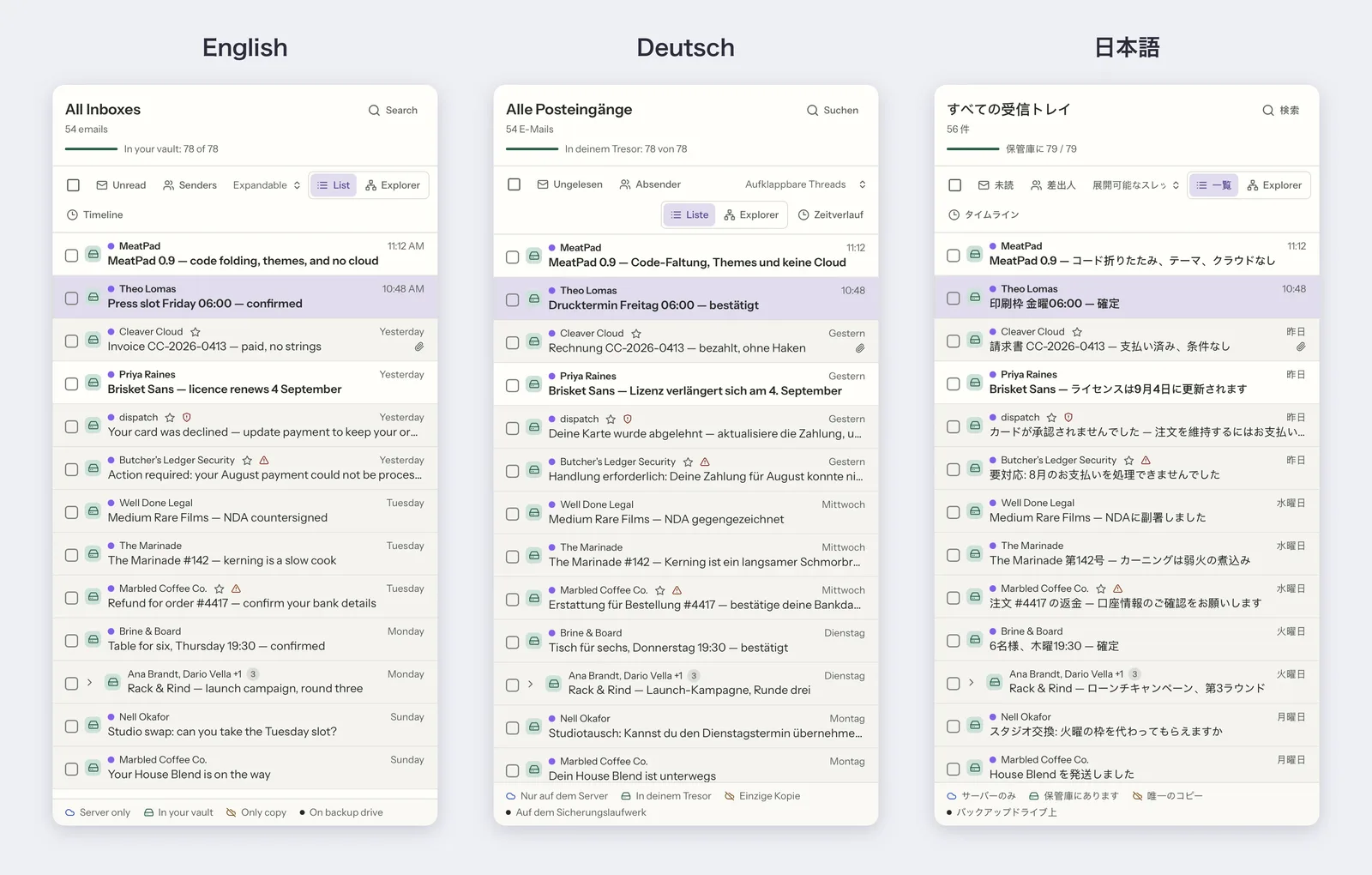
This page practises what it describes. The screenshot at the top and the clip below were captured in the language you are reading.
The payoff is not just polish. When a screenshot shows an older version, the stamp says so, and capturing the help media again in all nine languages is one queued run on the Mac mini instead of a week of manual work.
Habit: ship at least English plus the big eight European and Asian languages, and make the build enforce parity, placeholders, length and plurals. Then automate your screenshots and videos against a translatable demo dataset, so the pictures speak the same language as the words. Translators are not the bottleneck. Drift is.
Nine languages, down to the screenshots. MailVault saves your email as plain files on your own computer, so you can free up the server without losing a thing.
Visit MailVault →6. A good FAQ answers the awkward questions
MailVault's FAQ is about 60 questions split across nine topic pages: getting started, storage, providers, backup and restore, search and insights, scheduled send, Premium, your questions, and troubleshooting. A few things made it useful rather than decorative.
It answers the questions people are afraid to ask. "Do you offer a lifetime purchase?" gets a straight answer: no, not today, and here is why. "What happens to my emails if MailVault stops development?" is answered too: your archive is standard email files that other mail apps can open, and the source code is public. Those two answers do more for trust than any feature list.
Each answer has its own address. Every question is an anchor, so a support reply can link straight to it, and each topic page carries structured data so search engines can show the answer directly.
Answers are dated. Every help page has a footer showing which app version it was reviewed against and when. Screenshots are tagged with the version they were captured from. When the app changes, stale help is visible instead of quietly wrong.
It is searchable, and it degrades well. The help centre has a search index of about 990 entries, rebuilt in continuous integration. The search box stays hidden until its script loads, so a page without JavaScript never shows a broken control.
Habit: write the FAQ from your support inbox, not your feature list. Answer pricing, data ownership and "what if you disappear" plainly, and stamp every answer with the version it describes.
7. Make privacy a property of the architecture, not a promise
Privacy policies are promises. Architecture is proof. MailVault's privacy story is mostly made of decisions that remove the possibility of doing the wrong thing:
- Passwords and tokens live in the operating system's keychain, never in a configuration file.
- Gmail and Microsoft 365 sign in with OAuth, so you never hand the app your password.
- Mail is stored as plain email files in a standard Maildir folder, with import and export for MBOX. You can walk away with your archive at any time.
- The app has no telemetry and no account to create.
- There is a published security policy with response targets: acknowledgement within 3 working days, assessment within 10, and a fix aimed for within 90 days.
The pricing follows the same idea: free stays whole. The email client and unlimited manual backups are free. Premium pays for automation, such as scheduled backups, migration between accounts and cleanup rules, never for access to your own data.
Habit: for every privacy claim on your website, find the piece of architecture that makes it true. If you cannot find one, the claim is a promise, and promises break.
8. Test the way users break things
Great interfaces die quietly in regressions. As of this week MailVault has around 12,400 JavaScript test cases, about 7,000 Rust tests, and 210 end-to-end test files that click through the real app.
The part worth copying is not the count. It is that the repository includes its own fake mail servers. A mock IMAP server and a mock JMAP server start fresh for each run, seeded with accounts and an inbox of 700 messages, deliberately bigger than any page the app loads at once, so pagination is genuinely tested rather than assumed. Every run uses a throwaway home folder, so tests never touch a real archive.
Because MailVault is built with Tauri, its interface tests can drive the app through WebDriver, and the headless suite runs on a free Ubuntu runner on every change. The heavier suites run on a Mac mini before releases. What that setup costs compared with a SwiftUI app has its own note: 98 seconds for eight clicks.
Habit: build the fake version of whatever your app talks to, whether that is a mail server, a payment API or a sync backend, and make it awkward on purpose: too many items, slow responses, odd data.
9. Ship small and often, and update automatically
Seventy-two changelog entries in nine months only works because shipping is boring. On macOS the app updates itself, signed and notarised. There is also a Mac App Store build, a signed Windows installer, Linux packages and a Snap for both Intel and ARM machines, all produced by continuous integration from the same tag. A version consistency check makes sure the app, the website and the release can never disagree about which version is current.
Small releases make good design cheaper. When a user reports something confusing, the fix reaches them in days, not in the next quarterly update.
Performance is part of the same habit, and it gets written down with the version it was measured on. From the README, for version 2.16.0: a 53 MB macOS download, about 345 MB of memory with a 10,000-message inbox loaded, and smooth lists past 17,000 messages. Search speed has its own note: 50,000 emails, 14 milliseconds.
Habit: automate the release and the update so completely that shipping a one-line fix costs you nothing. And when you publish a performance number, publish the version next to it.
10. Test your website like you test your app
The website is part of the product. It is the first screen most people ever see, so MailVault's site has its own test suite:
- an SEO test checks that structured data, the sitemap and the file for AI assistants match the real pages
- a style test checks that every English page shares the same shell, has a main landmark and never exposes a personal email address
- a pricing test fails the build if the early-bird offer is ever described as "limited time" or "lifetime", because neither would be true
That last one is my favourite small test. Marketing copy drifts toward urgency on its own. A test is the only thing that reliably stops it.
Habit: anything on your website that would be embarrassing if it were wrong, such as prices, platforms and claims, deserves a test.
What we have not solved
Writing about your own app is only useful if you are honest about the gaps.
- There is no formal accessibility standard for MailVault yet. There is a lot of accessibility work, including focus trapping in dialogs, labelled controls, visible focus rings and reduced motion, but nothing measured against a written target.
- No right-to-left language ships yet, so Arabic and Hebrew layouts are untested.
- Mock mail servers are not Gmail. Real providers have quirks no mock captures, and OAuth sign-in is still verified by hand before releases.
The checklist
- Write product beliefs specific enough to lose an argument.
- Make each colour mean one thing, and derive it from one function.
- Use motion only to show that something changed.
- Design offline, undo, setup and errors as carefully as the happy path.
- Ship English plus the big 8, let the build enforce translation quality, and capture screenshots and videos in every language.
- Write the FAQ from real questions, answer the awkward ones, and date every answer.
- Make privacy a property of the architecture.
- Build fake versions of your backends and test against them.
- Automate releases and updates so small fixes are free.
- Test your website like you test your app.
None of this is glamorous. Most of it will never appear in a screenshot. But it is the difference between an app people try and an app people trust with something they cannot replace.
MailVault is free for macOS, Windows and Linux. Want to look before downloading? Try the live browser demo. The source code is on GitHub.
The mail you cannot replace, on your own disk. Free for macOS, Windows and Linux, in nine languages, with no account and no telemetry.
Visit MailVault →