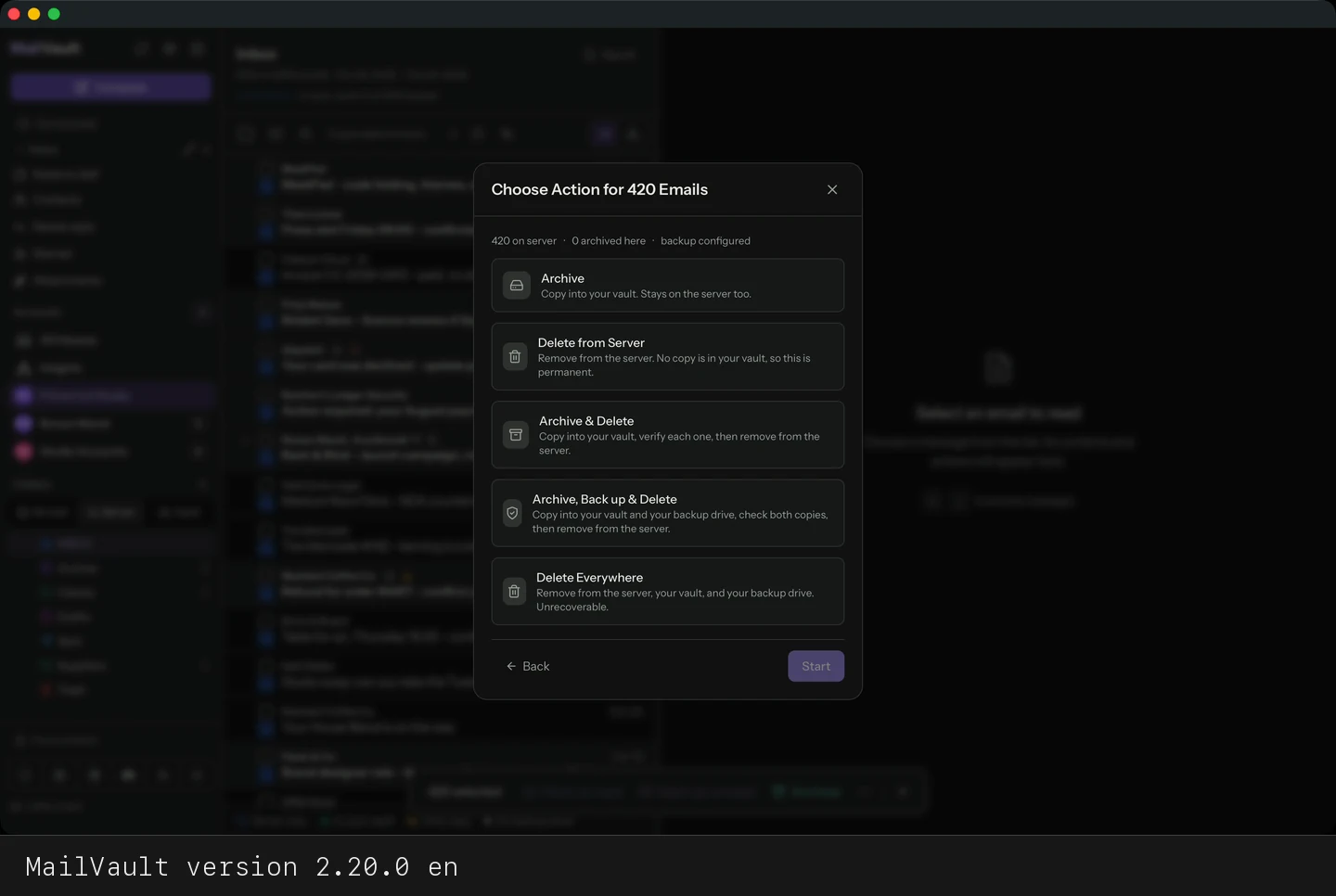
Yes, archived emails count towards storage. In Gmail, Outlook.com, Yahoo Mail and iCloud Mail, Archive only takes a message out of the inbox view. It remains on the provider's servers, inside your account, and keeps using quota until it is deleted and Trash has been cleared. The common exception is a Microsoft 365 online archive mailbox, which has a separate quota.
Why the word archive misleads people
Archive means two different things in email, and mixing them up is how many full mailboxes happen. In webmail it is a filing action: Gmail moves the message to All Mail, and Outlook.com, Yahoo Mail and iCloud Mail move it to a folder called Archive. Same account, same servers, still searchable. That is the whole point of the button.
In archiving software, the word means keeping a copy somewhere else. When we built MailVault, we used Archive in that second sense: put a copy on your own computer. Both meanings are reasonable. They answer different questions, and only one of them has anything to do with storage.
A quick test: does this action free space?
Before you click anything in a full mailbox, ask three questions. Does the mail leave the inbox? Does the provider stop storing it? Do you still have it afterwards?
| Action | Leaves the inbox | Frees provider storage | You still have the mail |
|---|---|---|---|
| Archive in Gmail | Yes | No | Yes, in All Mail |
| Archive in Outlook.com, Yahoo Mail or iCloud Mail | Yes | No | Yes, in the Archive folder |
| Move to a Microsoft 365 online archive mailbox | Yes | In the main mailbox, yes; the archive mailbox has its own limit | Yes, in the archive mailbox |
| Delete, Trash not emptied | Yes | Not yet | Yes, for up to 30 days in Gmail and Outlook.com |
| Delete and empty Trash | Yes | Yes | No |
| Copy to your computer, then delete from the server | Yes | Yes | Yes, on your own disk |
Only the last row gives you both things people usually want: the space back and the history kept.
Where the quota actually goes
Each service measures the whole account, not the inbox. Google gives 15 GB that Gmail, Drive and Photos draw from together, and archived messages are part of that. An Outlook.com mailbox holds 15 GB, and attachments are counted twice: once in the mailbox and once in the Microsoft cloud storage you share with OneDrive. Free Yahoo Mail accounts get 20 GB, Archive folder included. Mail kept in iCloud draws on your iCloud storage.
The total covers sent mail, your own folders, the archive and, with most providers, Spam and Trash too. So an empty inbox proves nothing about storage. Years of receipts, newsletters and attachments can sit one click away in All Mail or Archive, still billed against you.
What can go wrong when you try to fix it
- Clearing the whole archive in a hurry. The space returns, and so does the afternoon you spend looking for a 2021 receipt that no longer exists.
- Leaving Trash alone. Gmail and Outlook.com hold deleted mail for up to 30 days, and it is still counted while it waits there.
- Expecting the storage bar to react at once. Google notes the figure may lag by a day or more after a big clean-up.
- Mistaking the ordinary Archive folder for an online archive mailbox at work. Only the online archive has a separate limit, and only your organisation can switch it on.
Keeping archived mail without the quota
If you want the history but not the bill, the mail has to leave the server, and a copy has to exist somewhere you control before it does. That order is the entire design problem. In MailVault, Archive writes each email to a vault on your computer as a standard .eml file and does not touch the server; Delete from Server is a separate, deliberate step you take after you have looked at the copy. Both are free.
Premium joins the two steps into Archive & Delete. The reason it checks every vault copy before removing anything from the server is simple: a delete that runs ahead of a failed download is the one mistake an archive tool must never make. And keep a second copy on a backup drive, because one laptop is still one copy.
Provider details, including the Microsoft 365 exception, are on the MailVault site. Do archived emails count towards storage?
If your mail is in Gmail, start with what its Archive button does. Gmail archive explained
Sources and product details
Keep reading
- Gmail archive explained: where archived mail goes and when to use it
- Getting rid of old emails: delete, archive or export, compared
- Find and delete large emails: the size search for each mail service
Keep the email history you need. MailVault archives messages as standard EML files on your computer, with local search and optional paid automation.
Explore MailVault →